Hello everyone,
HQPlayer has been on the Serento roadmap for a while, and many of you asked about it. It is implemented, it now works with HQPlayer 5 as well as 6, and it has grown a lot more settings since the first look. Here is how it works and what it can do.
WHERE WE STARTED
HQPlayer 6 can appear on your network as a UPnP renderer, so in principle any control app can send it music one track at a time. That works, but it uses only a small part of what HQPlayer is: its own playlist, its upsampling, its filters and modulators stay out of reach, and the app has to keep feeding it track after track.
So Serento talks to HQPlayer in HQPlayer’s own language: the control protocol HQPlayer provides for control apps. Serento recognises HQPlayer on its own, remembers it, and from then on drives it natively. The only thing to do on the HQPlayer side is to switch on “Allow control from network” (the network button in HQPlayer’s toolbar), which is also what makes it visible on your network in the first place.
HQPLAYER 5 AND 6, DESKTOP AND EMBEDDED
Serento works with HQPlayer 5 and 6, Desktop and Embedded. HQPlayer Desktop 5 has no UPnP renderer of its own; in Serento it is an output anyway, found on your network through the same control protocol, and it takes your whole queue exactly like HQPlayer 6.
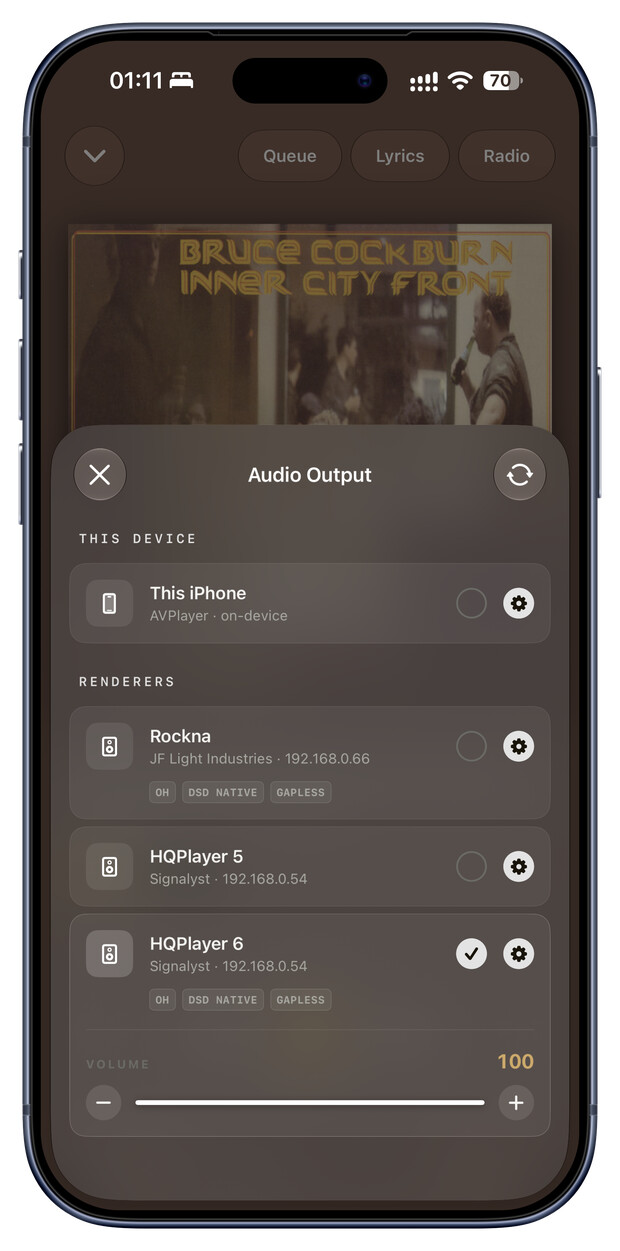
If your HQPlayer does not appear by itself, for example because it runs on another part of your network, the + in Settings, Audio Output adds it by its IP address.
YOUR QUEUE, IN HQPLAYER’S PLAYLIST
When you press Play, Serento hands your queue to HQPlayer’s own playlist, and HQPlayer plays through it by itself, track after track, gapless. Your phone is free to sleep; the music does not depend on it.
Changing the queue while music plays works the way you expect: Play Next, Add to Queue, moving and removing tracks all reach HQPlayer’s playlist, and the track you are listening to is never interrupted. HQPlayer’s playlist can only grow at the end, so Serento puts every change in its right place step by step, away from the moment one track hands over to the next.
HQPLAYER’S SETTINGS, FROM THE APP
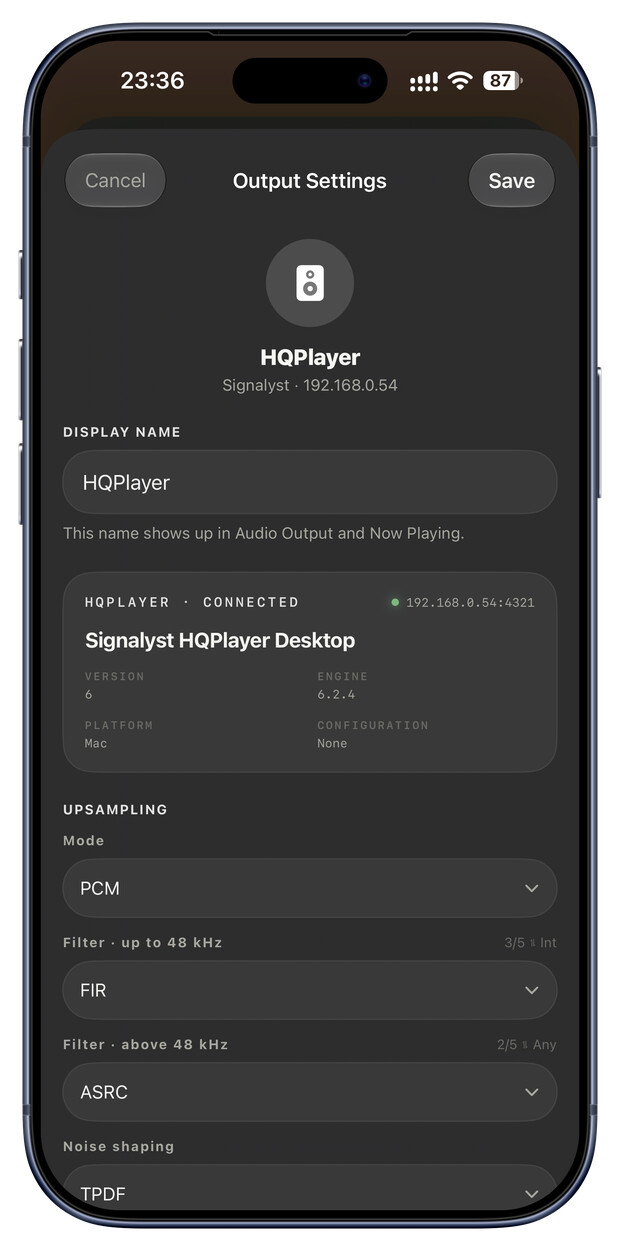
Open the gear next to HQPlayer in Audio Output (from Now Playing, from Settings, or the output panel on iPad and Mac).
At the top, a status card tells you whether HQPlayer answers, its address, the product, its version, engine and platform, and the saved configuration it is running.
Upsampling:
- Mode: source, PCM, or SDM (DSD) when your HQPlayer offers it for its current output device
- Filter up to 48 kHz, and filter above 48 kHz. HQPlayer 6 gives each filter a short description, shown beside its name; HQPlayer 5 gives none
- Noise shaping in PCM, or the modulator in SDM
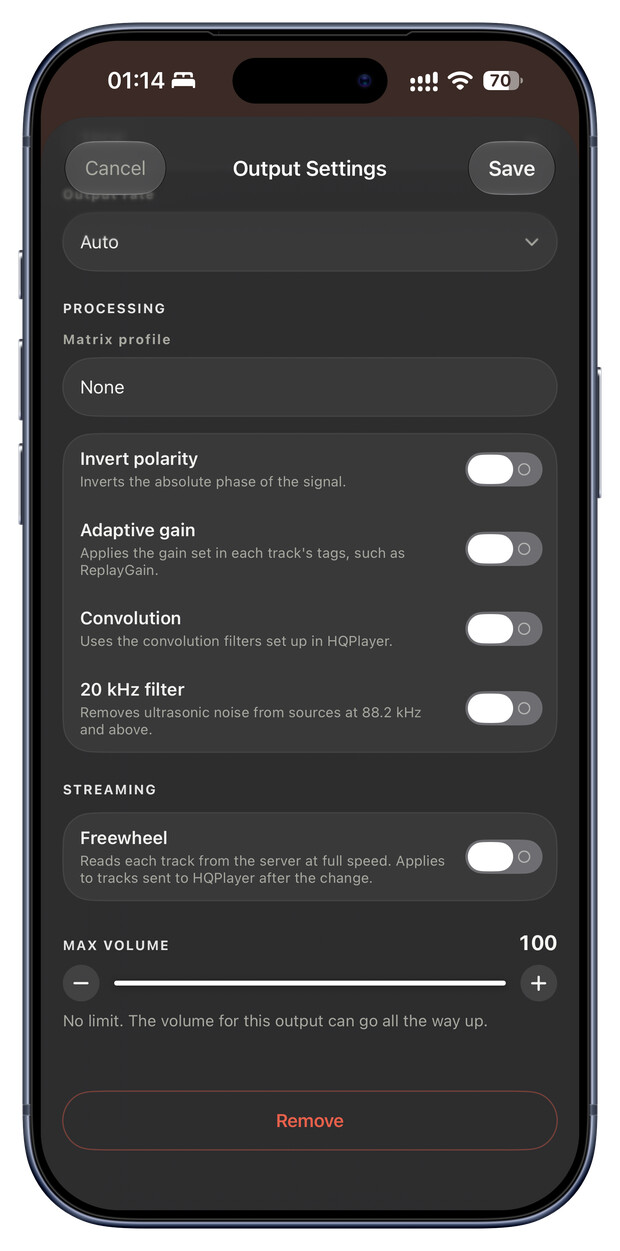
- Output rate, or Auto
Processing:
- Matrix profile, from the profiles saved in your HQPlayer
- Invert polarity, adaptive gain, convolution and the 20 kHz filter
Streaming:
- Freewheel, which asks HQPlayer to read each track from your server at full speed. It is sent with every track, so it applies to the tracks Serento sends after you change it
Every list comes from your HQPlayer, so you see exactly the filters, modulators, rates and profiles it offers on your system.
APPLIED WHEN YOU PRESS SAVE
In the first version a change went to HQPlayer the moment you chose it. HQPlayer has to stop to change a filter or a modulator, so changing five settings meant five interruptions. Now nothing is sent until you press Save: Serento keeps your choices and applies them all together, in the order HQPlayer needs them, so the music is interrupted at most once. Cancel sends nothing.
- When you pick a new mode, its noise shaping and output rates are HQPlayer’s lists for that mode, so they are chosen after Save, the next time you open the settings
- If HQPlayer stops playing after Save, Serento tells you, so you can try another combination. It does not start the music again on its own
- If HQPlayer refuses a setting, Serento says so and applies the rest
Saved configurations are shown, not switched: HQPlayer lets only the apps it has authorised load a configuration, so the status card tells you which one is running and you change it in HQPlayer itself.
Volume works too: Serento’s volume moves HQPlayer’s own volume, across the range HQPlayer allows, in 1 dB steps.
ON ALL YOUR DEVICES
The name you give HQPlayer in its settings, and Freewheel, belong to the output, not to the device: set them on your iPhone and they are there on your iPad and your Mac. The same goes for the name of any other output. On Apple TV, HQPlayer is listed among your outputs like any other.
SERENTO FOLLOWS HQPLAYER
You do not have to do everything from the phone. If you start the music in HQPlayer itself, Serento picks it up within a couple of seconds, with the track and the queue. If you stop it there, Serento shows it stopped. And if you quit HQPlayer while it plays, Serento shows the music stopped within a few seconds instead of pretending it is still playing.
WHAT I HAVE TESTED, AND WHAT I HAVE NOT
Everything above was built and tested against HQPlayer 6 Desktop and HQPlayer 5 Desktop on a Mac, with the whole queue playing from HQPlayer’s own playlist. HQPlayer Embedded speaks the same control protocol and should behave the same way, but I have not tested it yet. If you run Embedded, I would really like to hear how it goes.
It is coming in version 1.1.5. As always, if something looks wrong on your system, Settings, then Send Logs, tells me the rest.
Yours,
Lorin